 splines
← all scripts / norns
rotatable new
a Reactable emulator for monome norns — the tangible table synth, recreated virtually: no camera, no pucks, just the round table on screen, patched by proximit…
install
In maiden's REPL (the >> prompt at the bottom of the editor), run:
;install https://github.com/wildseyed/rotatableOr add the splines catalog to maiden and install it from the project manager. Restart norns if the script ships a new engine.
readme from wildseyed/rotatable
rotatable
a Reactable emulator for monome norns.
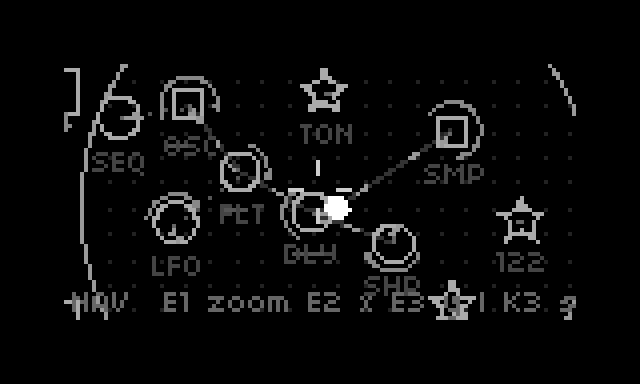
the Reactable (Reactable Systems, Barcelona, 2003–2014) was a tangible music table: acrylic pucks on a camera-tracked glowing surface became synth modules — generators, effects, controllers — patched together by proximity and turned by hand. Björk took one on tour; the company is gone and the tables are museum pieces. rotatable recreates it virtually on norns: no camera, no pucks — the round table lives on the 128×64 screen, driven by 3 encoders + 3 keys, with the original's sound-object set running as a SuperCollider engine.
v3.4.4 · github · discussion

install
on your norns, in maiden's REPL:
;install https://github.com/wildseyed/rotatable
then SYSTEM > RESTART (first run compiles the engine), and SELECT > rotatable.
on first run the bundled sample library is copied to ~/dust/audio/rotatable/,
so the factory presets and the loop browser share the norns audio pool.
your own samples for the loop browser: drop WAVs anywhere under ~/dust/audio/.
the idea
objects on a round table are synth modules. move them close together and they connect: generators feed effects, effects chain toward the output point at the table center, controllers (LFO, sequencer) drive their closest neighbor. everything connected to the center dot is heard.
your first patch (30 seconds)
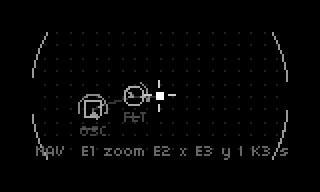
K1+K3→ place menu →K3places an oscillator at the reticle- it's already selected in MOVE mode — E2/E3 slide it near the center dot; a line forms → you're hearing it
K3once → ROTATE mode: E2 sweeps pitch, E3 loudness,K1+E2cycles sine/saw/square/noiseK1+K3→ place a filter, MOVE it onto the line between the osc and the center — the audio now routes through it; rotate the filter to sweep cutoffK1+K3→ place a sequencer near the osc — a melody starts; select it,K1+K3to edit its 16 steps
levels & keys
the UI is a hierarchy; K3 acts, K2 backs out, K1 modifies.
| level | you are here | keys |
|---|---|---|
| L1 NAVIGATE | flying over the table | E1 zoom, E2/E3 pan; K3 select object; K1+K3 place menu; K1+K2 clear table (with confirm) |
| L0 PLACE | the object menu | E2 scroll; K3 place at reticle; K2 cancel |
| L2 OBJECT | one block selected | K3 cycles MOVE → ROTATE → LINK; K1+K3 dive into config; K1+K2 delete block |
| L3 CONFIG | a block's panels | E1 page, E2/E3 edit; K2 back |
| SYSTEM | master menu | hold K1+K2+K3 for 1 s to open; E2 scroll, K3 select, K2 close |
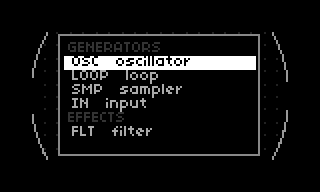
L2 modes
- MOVE: E2/E3 glide the object with accel/decel physics (connections form/break live as it slides); the camera tracks the block so it stays under the reticle
- ROTATE: E2 = main param, E3 = the slider (amp / dry-wet / feedback /
depth / resonance per type),
K1+E3= fine adjust,K1+E2= subtype - LINK: E2 cycles targets by proximity;
K3toggles hardlink (permanent, bright line);K1+K3mutes the connection (dimmed) - E1 hops selection between objects in every L2 mode, centering the camera on each
K2walks back through modes (LINK → ROTATE → MOVE → NAV)
subtype cycling: most objects have several flavors (sine/saw/square/ noise, lp/bp/hp, ring/chorus/flanger…). hold
K1and turnE2to cycle them — works in ROTATE mode and on every config (L3) page; the subtype name shows in the status line / panel header.
cheat sheet
every control, in every mode — including the combos that currently do
nothing (marked — free; they fall through to the unshifted action or
nothing at all, so they're open real estate for new ideas). bold rows are
the essentials — the ones you'll touch every session, plus the few you
must not miss (like saving your work to a slot). K1 is a held
shift only: its short tap always belongs to the norns system menu, and
hold K1+K2+K3 for 1 s opens the SYSTEM menu from anywhere.
NAV (flying over the table; the reticle at screen center is your hand)
| control | action |
|---|---|
| E1 | zoom (CW in / CCW out) |
| E2 | pan X |
| E3 | pan Y (inverted) |
| K1+E1 | slot focus prev/next — the camera flies to each patch slot |
| K1+E2 | — free (pans X, same as E2) |
| K1+E3 | — free (pans Y, same as E3) |
| K2 | — free (only cancels an armed table-clear) |
| K3 | select nearest object → MOVE · on a slot ring: tap = recall, hold = store (empty) / delete (occupied) — this is how you save your table |
| K1+K2 | arm table-clear (K3 confirms, K2 cancels) |
| K1+K3 | open the PLACE menu |
MOVE (block glides with physics; connections form/break live)
| control | action |
|---|---|
| E1 | hop selection to next/prev object (camera follows) |
| E2 | glide X (impulse + friction; soft wall at the rim) |
| E3 | glide Y |
| K1+E1 | hop selection (same as E1) |
| K1+E2 | — free (glides X, same as E2) |
| K1+E3 | — free (glides Y, same as E3) |
| K2 | back to NAV |
| K3 | → ROTATE |
| K1+K2 | delete the block → NAV |
| K1+K3 | → CONFIG panels |
ROTATE (the original's two-axis gesture: rotation + finger dot)
| control | action |
|---|---|
| E1 | hop selection |
| E2 | rotation = main param (generators retrigger on turn) |
| E3 | the slider: amp / dry-wet / feedback / depth per type |
| K1+E1 | hop selection (same as E1) |
| K1+E2 | cycle subtype |
| K1+E3 | fine-adjust the slider |
| K2 | → MOVE |
| K3 | → LINK |
| K1+K2 | delete the block |
| K1+K3 | → CONFIG panels |
LINK (explicit connection surgery)
| control | action |
|---|---|
| E1 | hop selection |
| E2 | choose target (cycles objects by proximity) |
| E3 | — free |
| K1+E1 | hop selection (same as E1) |
| K1+E2 | — free (cycles target, same as E2) |
| K1+E3 | — free |
| K2 | → ROTATE |
| K3 | toggle hardlink to target (bright double line) |
| K1+K2 | delete the block |
| K1+K3 | toggle mute of that connection (dimmed) |
object reference
| object | role | rotation (E2) | E3 | subtypes (K1+E2) |
|---|---|---|---|---|
| oscillator | generator | pitch | amp | sine / saw / square / noise |
| loop | generator | playback rate | amp | loop / oneshot (browser panel) |
| sampler | generator | pitch | amp | instrument / drum (browser + base pitch panels) |
| input | generator | gain | — | line |
| filter | effect | cutoff | resonance | lp / bp / hp |
| delay | effect | time | feedback | feedback / pingpong / reverb |
| modulator | effect | main (pitch/depth/flanger freq) | dry-wet | ring / chorus / flanger |
| waveshaper | effect | main | dry-wet | resampler / compressor / distortion |
| lfo | controller | rate | depth | sine / saw / square / random |
| sequencer | controller | pattern preset (1–6); drift: sparseness | — | mono / random / drift |
| midi | controller | transpose ±24 st | — | in |
| tonality | global | root key | — | major / minor / pentatonic / chromatic |
| tempo | global | BPM (40–240) | — | bpm (label shows the value) |
| output | global | master volume | — | — (the star; never connects) |
midi in: vport + channel in PARAMETERS (midi in vport,
midi in channel). notes route to the midi object's closest object,
velocity sets amp, note-off releases the gate.
capabilities in depth
patching & connections
all connections form by proximity — no menus, no cables:
- generators connect to the nearest effect in range, else straight to the output point (the white dot at the table center)
- effects chain toward the center: an effect connects to the next effect closer to the output point, else to the output point itself
- controllers (lfo, sequencer, midi) drive their closest non-global object
- hardlink (LINK mode,
K3): pins two objects permanently, bright double line — a controller can drive a specific target regardless of distance - mute (LINK mode,
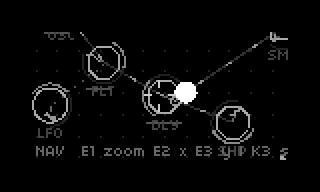
K1+K3): temporarily cuts a connection, dimmed - audio connections are solid lines with bright dashes marching in the signal direction; control connections are dotted
- everything with a path to the output point is heard; the output point pulses at the current tempo
tempo & sync
one BPM (rot_tempo param, 40–240) drives everything; the tempo object
puts it on the table (rotation = BPM) and the output point pulses it:
- lfo:
sync+mult— period = N 32nd notes (1–128) - delay:
syncquantizes delay time to 32nd notes;sweepglides time changes - loop:
sync= start on the next 32nd/quarter/bar boundary - sequencer: 32nd-note clock; per-step duration in 32nds
the sequencer
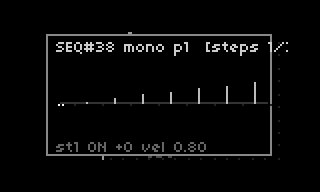
16 steps × 6 stored patterns per object (rotation switches, header shows
p1–p6); per-step pitch (±24 st), velocity, and duration. duration sets
both the step's length in the grid and the note's gate time (a note releases
before the next step — rests are real silence). targets:
- oscillator / sampler: plays the note (velocity → amp, ADSR gate); drum samplers ignore the note's pitch (always one octave)
- loop: oneshot loops retrigger per step
- any effect: retriggers its param envelope (cutoff / feedback / dry-wet sweep) with velocity as envelope depth; the note's pitch also sweeps the waveshaper's main parameter and the delay time
- random subtype: improvises, snapped to the table tonality — with a restricted scale this is the original's "automatic solos"; the steps page shows the improvised-note history live
- drift subtype: no pattern — fires at random intervals (
gaplo–gaphi32nds on the set page, shown in seconds), with per-call velocity and pitch jitter; rotation sets sparseness. for untimed texture: frogs, rain, crowd murmur
tonality
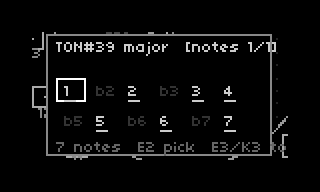
one tonality object sets the table's scale (root on rotation, first object wins). it constrains sequencer notes, random improvisation, and sampler/subs pitches. the scale itself is editable: 12 toggleable degrees on the notes panel; subtypes are preset loads (major/minor/ pentatonic/chromatic) you can then customize.
sound design extras
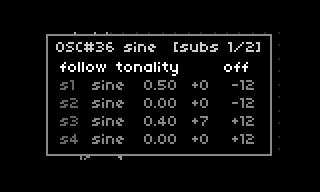
- sub-oscillators (oscillator): 4 subs × waveform/amp/detune/offset, with a follow-tonality toggle that snaps sub pitches to the scale (the snap applies at edit/trigger time — an LFO wobbling the osc's pitch drifts subs off-scale afterwards, by design)
- effect envelopes: every effect has a sequencer-triggered ADSR on its signature parameter — idle-neutral by default
- sampler: single WAV pitched melodically;
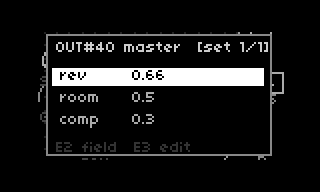
basetunes the sample's natural pitch in semitones from C4; instrument (gated ADSR) and drum (one-shot) subtypes - global FX (output object): master reverb (mix + room) and compression on the output bus; neutral when the output object is absent
- midi in: notes land on the closest object (pitched or envelope trigger), rotation = transpose ±24 st
visuals: blocks carry a subtype pictogram on their rim (orbits with rotation) and a perimeter arc gauge (sweep = slider value, like the reactable's orbital track); oscillator/sampler add a semitone marker on the left half and an inner octave arc; audio connections show signal-flow dashes, control connections marching dots; the output point pulses at the tempo; sounding objects get a VU bar under the glyph.
block settings guide
every block works the same way: K3 on a selected block cycles
MOVE → ROTATE → LINK, K1+K3 dives into its config panels, K2
backs out, K1+K2 deletes the block. in ROTATE: E2 is the block's
main knob (rotation), E3 is the slider dot, K1+E3 is a fine
adjust, K1+E2 cycles subtypes. inside the panels: E1 switches
page, E2 picks a field, E3 edits it, K1+E2 still cycles
subtypes.
per block (rotation / slider / subtypes, then its panels):
- oscillator — pitch (55–880 Hz) / amp / sine·saw·square·noise (noise:
rotation = lowpass cutoff). panels: subs (4 sub-oscillators; first
field is a
followtoggle that snaps sub pitches to the table tonality, then per sub: waveform, amp — 0 = off, detune in cents, offset in semitones) and env (amplitude ADSR, gated by incoming sequencer/MIDI notes; without a controller the osc drones at the sustain level, with one: low sustain + short decay = plucks). - loop — playback rate (0.25–4×) / amp / loop·oneshot. panels:
browser (scroll
dust/audio,K3loads), set (sync: restart on the next quarter/bar boundary — keeps loops in phase), env (amplitude ADSR, articulated by sequencer/MIDI triggers; sustain 1 = free-running loops stay full volume). tips: rate < 0.5 turns drum hits into bass drones (ZOO); oneshot fires the whole sample once per trigger instead of free-running. - sampler — played pitch / amp / instrument·drum. panels: browser,
set (
base: the loaded sample's natural pitch — set this to the WAV's note so sequenced pitches play in tune; the bundled instruments carry it in the filename, e.g.cello_G3), env. instrument is a gated melodic voice; drum is a one-shot that always plays at the rotation-set pitch, whatever note the sequencer sends. - input — gain / — / line only. no panels. route it through a compressor → reverb-delay and the table becomes an effects box.
- filter — cutoff (40 Hz–12 kHz) / resonance / lp·bp·hp. panels: 2d (X = cutoff, Y = resonance), env (param envelope → cutoff; triggered by a connected sequencer, it gives the ACID-style bite — attack instant, short decay, sustain 0).
- delay — time / feedback / feedback·pingpong·reverb
(reverb: rotation = room size, feedback = mix). rotation is a hybrid:
continuous near zero, snapping to 32nd notes of the tempo past an 8th
note — musical values click in on their own. panels: 2d (time /
feedback), set (
sync= always quantized to the grid;sweepglides time changes like tape), env (param envelope → feedback; a sequencer targeting the delay makes the echoes swell, see PING — and the note's pitch sets the delay time). - modulator — effect character / dry-wet / ring·chorus·flanger
(ring: rotation = mod frequency; chorus: rotation = depth; flanger:
rotation = flanging frequency). panels: set (chorus:
rate; flanger:fdepth,mindelay,ffb), 2d, env (→ dry-wet). - waveshaper — effect amount / dry-wet / resampler·compressor· distortion (resampler = bitcrush). panels: 2d, env (→ dry-wet).
- lfo — rate / depth / sine·saw·square·random. new LFOs start
beat-locked to the tempo. panel: set
(
sync= tempo lock (on by default; toggle off for free-running rate);mult= period in 32nd notes — 8 = quarter note, 32 = whole note). an LFO modulates its closest block's signature parameter (pitch, cutoff, time, shaper amount, dry-wet...); hardlink it to choose the target. - sequencer — rotation switches 6 stored patterns (
p1–p6in the header) / — / mono·random·drift. panels: steps (E2 step, E3 pitch ±24 st,K1+E3velocity,K3toggle), vel, dur (step length in 32nds, 1–8; 2 = a 16th — also the note's gate length). random subtype improvises into the tonality; its steps page shows the note history it has played. drift subtype drops the pattern: it fires at random intervals with slight velocity and pitch jitter — rotation sets the maximum gap (sparseness), and its set page editsgaplo/gaphiin seconds. - midi — transpose ±24 st / — / in only. no panels; vport + channel live in PARAMETERS.
- tonality — root key / — / major·minor·pentatonic·chromatic. panel:
notes — the scale as 12 toggleable degrees (E2 picks, E3/
K3toggles). subtypes load presets you can then customize; your edit survives saving, cycling the subtype reloads the preset. - tempo — BPM (40–240) on rotation; the glyph shows the value. no panels.
- output — master volume on rotation (the star; never connects).
panel: set — global FX:
rev(master reverb mix),room(reverb size),comp(master compression). neutral when absent.
tempo lives in PARAMETERS (40–240 BPM) — or on the table, via the tempo object's rotation.
patch slots
pan outside the table edge: 16 numbered slots in a ring. the boxes are world-fixed like blocks — they grow as you zoom in, so they stay visible landing targets when navigating way zoomed in.
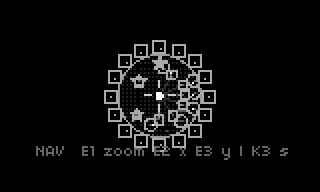
- long-press K3 empty slot → store the whole patch (objects, params, sequences, samples, links, tempo)
- short press K3 occupied slot → recall
- long-press K3 occupied slot → delete
- K1+E1 → move a slot focus without loading: the camera flies to
center each focused slot on screen (status line shows
SLOT n); K3 loads the focused slot. quick A/B: flick to a slot, K3, flick back, K3. any plain camera move (E1/E2/E3) dismisses the focus
slots persist as files (~/dust/data/rotatable/slots/) — they survive
restarts and reinstalls.
factory presets — the SYSTEM menu (K1+K2+K3 held 1 s) has
RESTORE PRESETS, which overwrites all 16 slots with the bundled factory
set (with a confirm). the sixteen form a tutorial arc: each is a complete
musical sketch that also teaches one or two concepts.
| slot | name | BPM | teaches | what's in it |
|---|---|---|---|---|
| 1 | HELLO | 72 | proximity patching, rotation = pitch, slider gauge = amp, pingpong delay | sine + sub-octave plays a slow C-major-pentatonic motif with long breaths into a pingpong delay — new-age first contact |
| 2 | BEAT | 122 | sampler, hardlink (LINK K3), step editor, velocity ghosts, drum pinning |
kick/snare/hat, each with a hardlinked 16-step sequencer; the kick's pitch steps are ignored on purpose (drum = one octave) — velocity is the dynamics |
| 3 | KIT-808 | 124 | multiple hardlinks, mute (LINK K1+K3), flanger settings page |
TR-909 kit + clap, each own sequencer; hat runs through a tuned flanger (fdepth/mindelay/ffb); muted alt-snare ready to unmute; comp 0.3 |
| 4 | KEY | 92 | bass riffs, custom scale masks (dorian!), call-and-answer | contrabass plays a tresillo-driven A-dorian bass riff; a sine answers in the gaps; the tonality's notes panel shows the custom dorian mask |
| 5 | GRIT | 76 | suboscillators, distortion, LFO → shaper main | saw + 2 subs → distortion → LP; a slow LFO wobbles the distortion amount under a greasy E-minor-pentatonic riff |
| 6 | SHINE | 66 | Pink Floyd atmosphere, long-release pads, filter tide | the Bb–F–G–E motif on a long-release saw over a droning detuned twin; LP swept by a 2-bar LFO tide; pingpong echoes, big reverb |
| 7 | PING | 100 | delay subtypes, pingpong, effect envelopes | clave + cowbell → tempo-quantized pingpong; a third sequencer's notes retrigger the delay's envelope so feedback swells |
| 8 | SIREN | 96 | note → delay time (dub siren), effect-as-instrument | sine plucks → feedback delay at 0.8; a second sequencer plays the delay time — the echo is the melody |
| 9 | CHOIR | 60 | parallel generators at the output, chorus, vibrato LFO | cello + violin a fifth apart + sub-osc drone, chorus, whole-note LFO swell, big reverb |
| 10 | TIDE | 80 | note → waveshaper main, sequencer-driven breathing | F-lydian pulse through a compressor; a second sequencer sweeps the compression by pitch over 4 bars — the whole table breathes |
| 11 | SOLO | 112 | random sequencer + pentatonic = automatic solos | dense random sequencer → theremin → chorus → feedback delay; velocity carries the dynamics, every dice roll is in scale |
| 12 | DRIFT | 66 | multiple generators into one effect, per-osc drift LFOs, sequencer→effect envelopes | three detuned/stacked saws into one LP, each with its own slow pitch-drift LFO; a random sequencer reopens the filter; pentatonic haze over a root drone |
| 13 | CLAVE | 104 | world percussion, tresillo rhythm, velocity accents | double-tresillo clave + answering rim + low tom heartbeat (a whisper of bitcrush on the tom) + hats leaning on the 3-feel |
| 14 | SIX | 118 | pattern presets 1–6 as song sections | one saw lead → LP + a kick pulse; a single sequencer holds six authored patterns — rotate through intro/verse/build/peak/break/outro |
| 15 | ZOO | 80 | sound design: generators don't have to be musical; drift sequencers | elephant → bandpass → pingpong call-and-response; double-time crickets as a shaker; quarter-speed bear-growl drone through the bitcrusher; frog one-shots; three coquí frogs calling at random intervals, each its own pitch and density |
| 16 | FINALE | 122 | everything at once | 15 objects: drum kit, tuba bass, horn stabs, theremin pad, A-minor tonality, full master FX — the demo you play people |
playing the presets — a tour, in order; each "try" uses the gestures from the block settings guide above:
- HELLO — the minimum viable table, new-age edition. try: rotate the osc while the motif breathes (E2 in ROTATE), then rotate the delay — past an 8th note the time snaps to the tempo grid on its own. move the sequencer far from the osc and the melody stops — proximity is the patch cable.
- BEAT — your first drum machine. try:
^K3into the kick sequencer's steps page — the pitch steps do nothing (drums stay in one octave), but the ghost velocities do everything. rotate the kick itself to retrigger it by hand. - KIT-808 — the full kit plus one trick. try:
^K3the flanger under the hi-hat — its set page hasfdepth,mindelay,ffb. then find the dimmed connection to the alt snare and unmute it in LINK mode (K1+K3). - KEY — the bass riff table. try: open the tonality's notes page —
that's a hand-built dorian mask; toggle degree
9off and hear the riff turn minor. rotate the tonality to transpose the whole table. then rotate the contrabass itself for a different riff register. - GRIT — the LFO as a second hand on the amount knob, now at a
grease tempo. try: the LFO's slider (E3) is depth — it wobbles
distortion drive, not dry-wet. break its hardlink (LINK,
K3) and it wanders to the filter instead. - SHINE — the Pink Floyd one. try: nothing for thirty seconds — the motif answers itself. then ride the filter's rotation slowly, or pull the delay feedback toward 0.9 and let the echoes play the room.
- PING — rhythmic echo. try: the delay's set page —
syncoff frees the time knob from the grid;sweepup for tape-style pitch glides. the third sequencer only exists to poke the delay's envelope. - SIREN — the echo is the instrument. try:
^K3the second sequencer and change its pitches — you're writing the echo's melody, not the pluck's. delay feedback toward 0.9 for near-self-oscillation;sweepglides the time changes like tape. - CHOIR — patience. try: nothing, for a minute — the vibrato LFO has a whole-note period. then open the chorus 2d page and push depth up.
- TIDE — the table breathes. try: nothing — the second sequencer
pumps the compressor over 4 bars. then open the tonality's notes page:
the #4 (degree
6) is what makes it lydian — toggle it off mid-swell and the sparkle vanishes. - SOLO — hands off, dense again. try: nothing — the random sequencer improvises and the pentatonic tonality keeps every roll musical. open its steps page to watch the note history appear. raise the delay's feedback slider for a longer trail.
- DRIFT — width from numbers, now anchored. try: nothing at first — the root drone holds the floor while the saws drift and the random sequencer reopens the filter. then raise a drift LFO's depth slider into detune-wobble territory.
- CLAVE — world percussion. try: clap the tresillo along with the
clave (3-3-2, 3-3-2).
^K3the hat's steps page and raise the off-beat velocities; the tom's whisper of bitcrush lives on the shaper's slider. - SIX — arrangement by rotation. try: perform it — rotate the lead sequencer (E2 in ROTATE) through p1→p6: intro, verse, build, peak, breakdown, outro. then write your own six on its steps pages.
- ZOO — the weird one. try: rotate the crickets loop — rate 2 is a shaker, rate 0.5 is a swamp. the elephant goes through a bandpass and a pingpong; the bear drone is a loop at quarter speed into the bitcrusher. the three coquís on the left are drift sequencers — rotate one to thin its calls out, or open its set page for the gap range.
- FINALE — perform it. try: mute parts in LINK mode (
K1+K3) and bring them back; ride the output's rotation (master volume); the master reverb/compression live on the output's set page.
dev
development branch: main (docs, plans, tooling). the default release
branch is what ;install clones — script files only.
REST bridge for agents (tools/api.py, default localhost:8787) — a
permanent feature, built for AI-performance experimentation: it drives
the running script over matron's websocket so an agent (or any HTTP
client) can perform on the table. direct manipulation: POST /place /move /rotate /set /load /step /mute /remove /clear; UI simulation
through the real interaction state machine: POST /key /enc; state +
levels: GET /state /amps; escape hatch POST /lua.
discussion
Like this script? React with 👍 or ❤️ below (needs a GitHub account). Reactions count as likes (♥) on splines, updated daily.